
A practical guide for building governed, testable analytics with dbt on Snowflake

By Hanumanthrao S • 3/16/2026
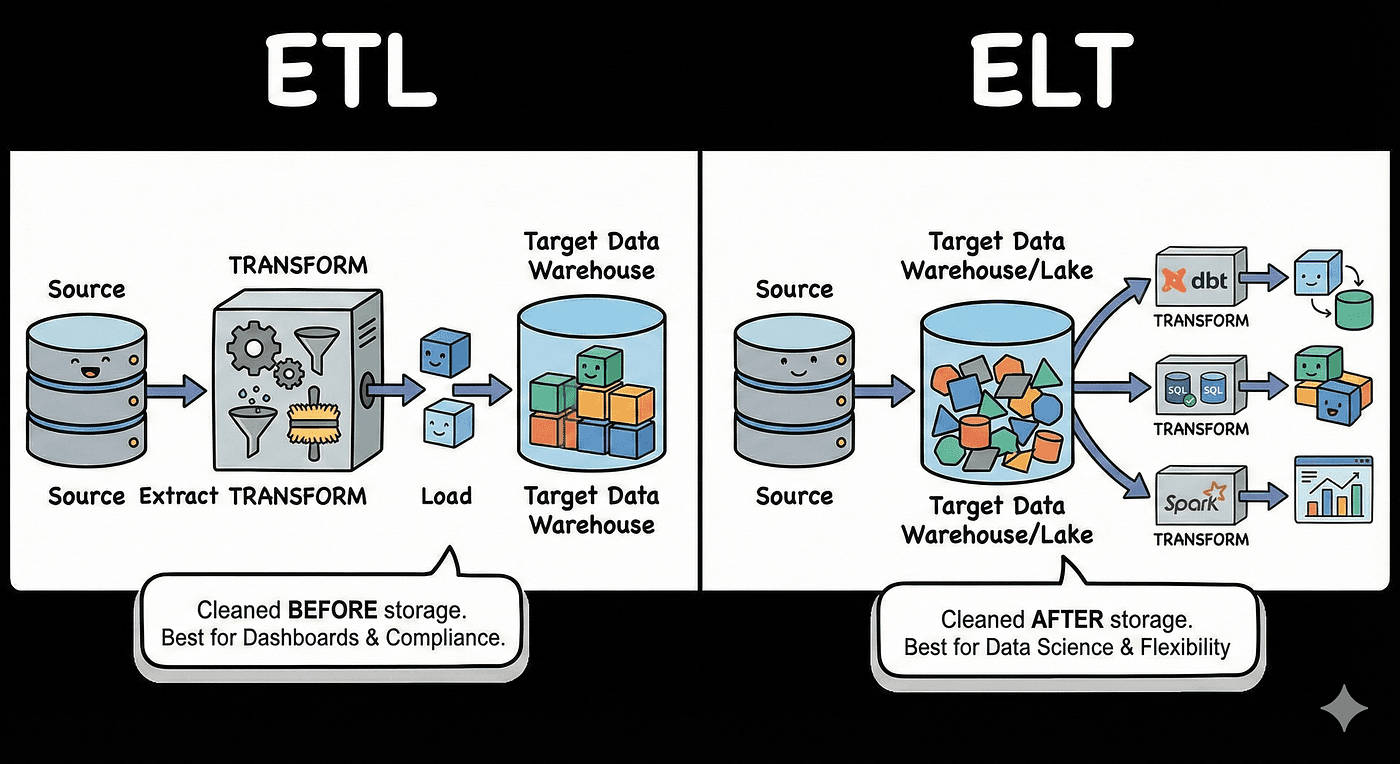
Moving from ETL to ELT lets you land raw data in Snowflake first and transform it in the warehouse using dbt.
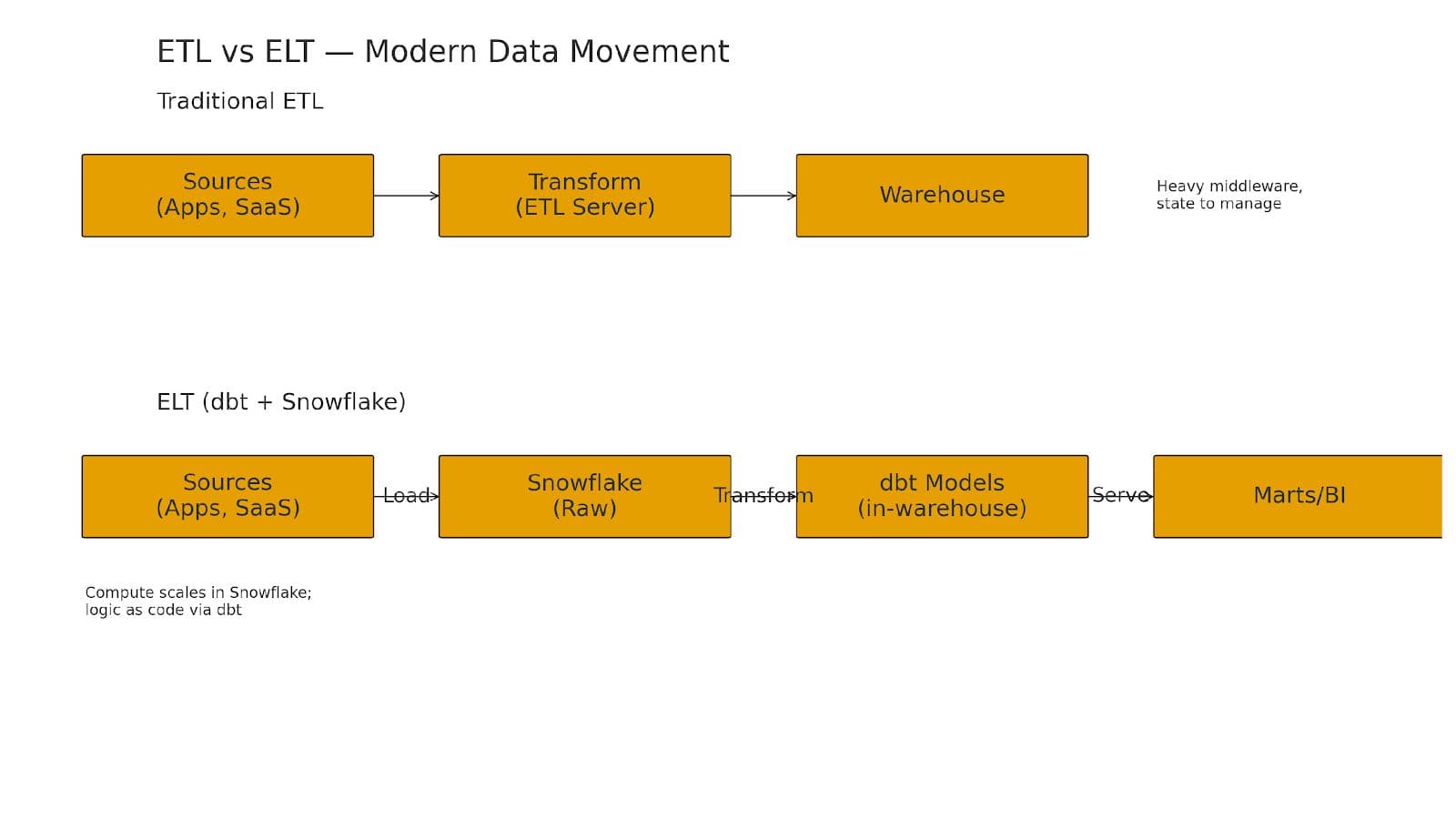
Figure 1. ETL vs ELT — modern data movement
Moving from ETL to ELT lets you land raw data in Snowflake first and transform it in the warehouse using dbt. You get simpler pipelines, version-controlled SQL, automated testing, and faster iteration—without the fragility of heavyweight transform servers.
Why ELT (and why now)?
Traditional ETL pushed heavy transforms into middleware before loading to the warehouse—expensive servers, complex dependencies, and hard-to-version logic. ELT flips it: Extract and Load data directly into Snowflake, then Transform it in-warehouse with dbt.
Benefits:
Elastic compute in Snowflake for scalable transforms.
SQL-as-code with dbt: modular models, tests, docs, lineage, and CI.
Faster iteration and simpler orchestration.
The dbt + Snowflake mental model
Use clear layers to separate concerns and speed iteration:
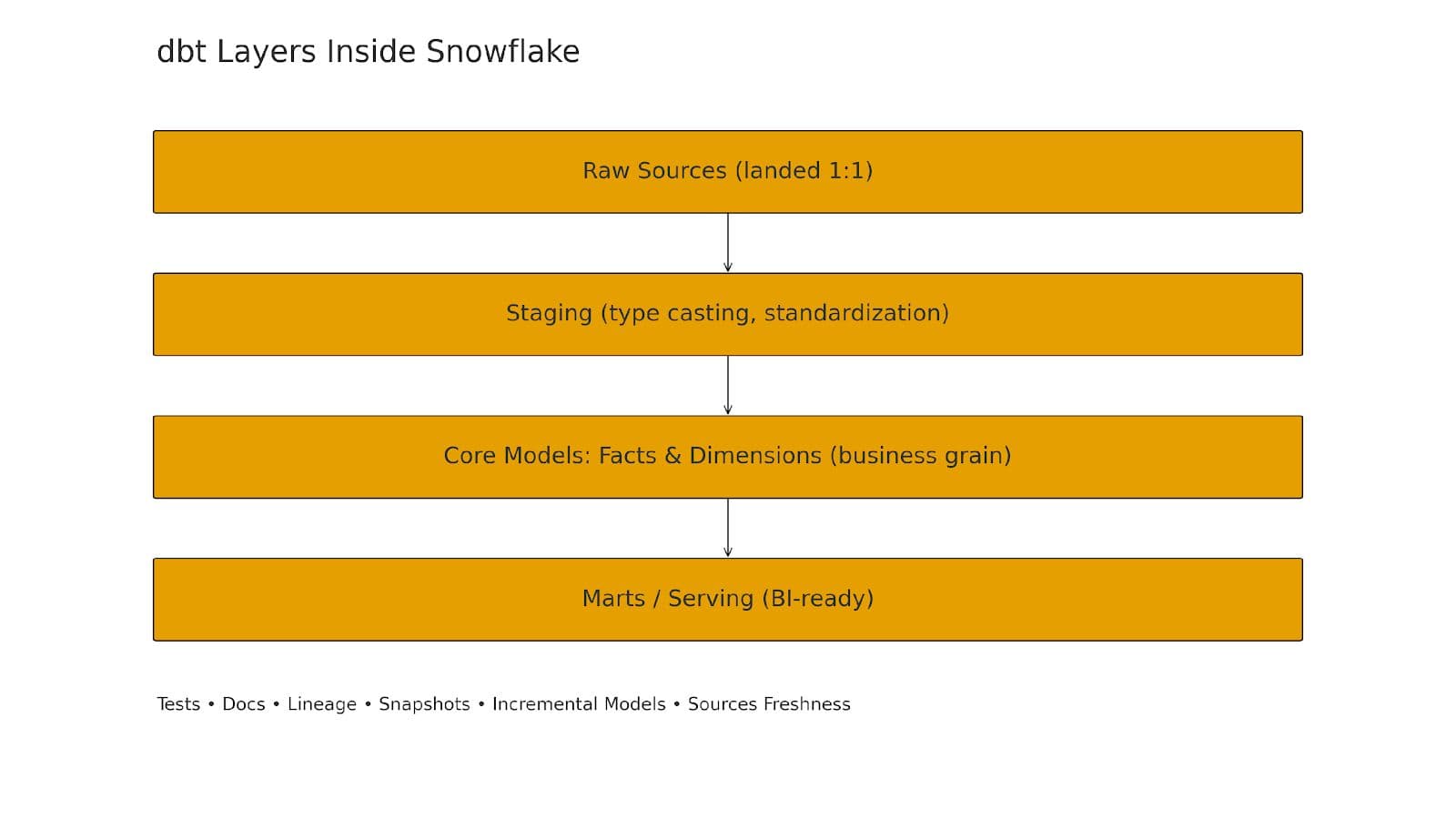
Figure 2. dbt layers inside Snowflake—Raw → Staging → Core → Marts
Raw layer
Land source tables 1:1 (e.g., raw.stripe_charges, raw.shopify_orders). Keep them immutable; add snapshots if you need historical tracking.
Staging layer
Clean types, standardize timestamps/IDs, and apply light semantics (one model per source table).
Core layer (marts)
Build business entities and facts: dim_customer, fct_orders, fct_revenue. Aggregate, join, and enforce grain here.
Serving layer
Thin, consumption-friendly models for BI tools (Tableau/Power BI/Looker) or data apps.
A concrete mini-architecture
/dbt_project
/models
/sources
stripe.yml
shopify.yml
/staging
stg_stripe__charges.sql
stg_shopify__orders.sql
/core
dim_customer.sql
fct_orders.sql
fct_revenue.sql
/marts
finance__daily_rev.sql
marketing__customer_cohort.sql
/snapshots
customers_snapshot.sql
/tests
schema.yml
/macros
get_loaded_at.sql
safe_divide.sql
Example source config (models/sources/stripe.yml)
version: 2
sources:
- name: stripe
schema: raw
tables:
- name: charges
loaded_at_field: _loaded_at
freshness:
warn_after: {count: 6, period: hour}
error_after: {count: 24, period: hour}
Example staging model (models/staging/stg_stripe__charges.sql)
with src as (
select
id as charge_id,
customer as customer_id,
amount/100.0 as amount_usd,
status,
created as created_ts
from {{ source('stripe', 'charges') }}
)
select * from src
Example fact model (models/core/fct_revenue.sql)
{{ config(materialized='incremental', unique_key='charge_id') }}
with charges as (
select * from {{ ref('stg_stripe__charges') }}
)
select
charge_id,
customer_id,
amount_usd,
status,
date_trunc('day', created_ts) as charge_date
from charges
{% if is_incremental() %}
where created_ts > (select coalesce(max(charge_date), '1900-01-01')
from {{ this }})
{% endif %}
Validation tests (models/tests/schema.yml)
version: 2
models:
- name: fct_revenue
tests:
- not_null:
column_name: charge_id
- unique:
column_name: charge_id
Cost & performance in Snowflake
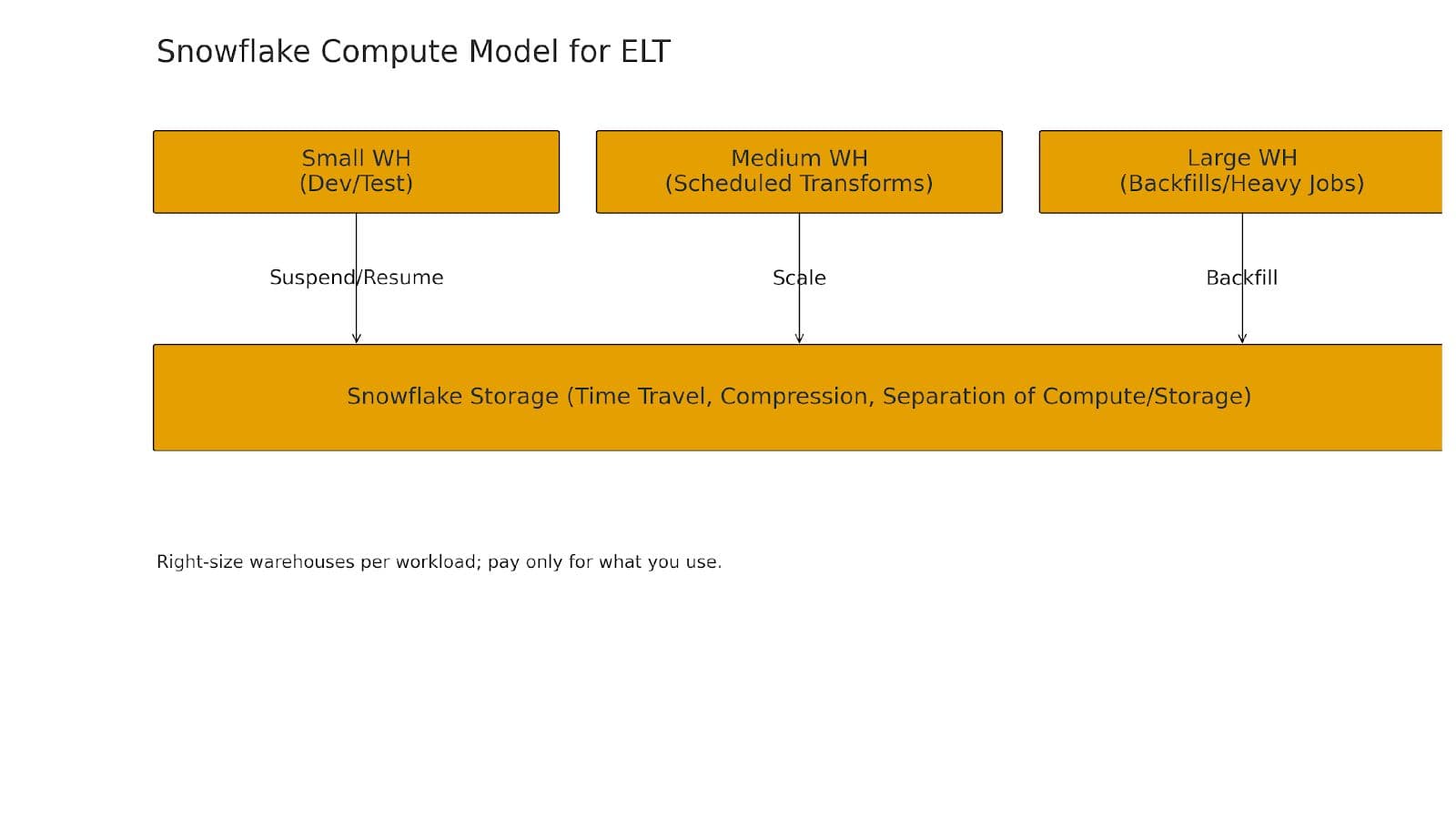
Figure 3. Right-size warehouses per workload; pay only for what you use.
Use dedicated Small/Medium/Large warehouses for Dev, scheduled transforms, and backfills.
Prefer incremental models for large facts; choose a robust unique_key.
Consider clustering on high-selectivity columns and leverage result caching.
Separate dev/prod using roles, databases, and warehouses; map them to dbt targets.
Orchestration & CI/CD with dbt
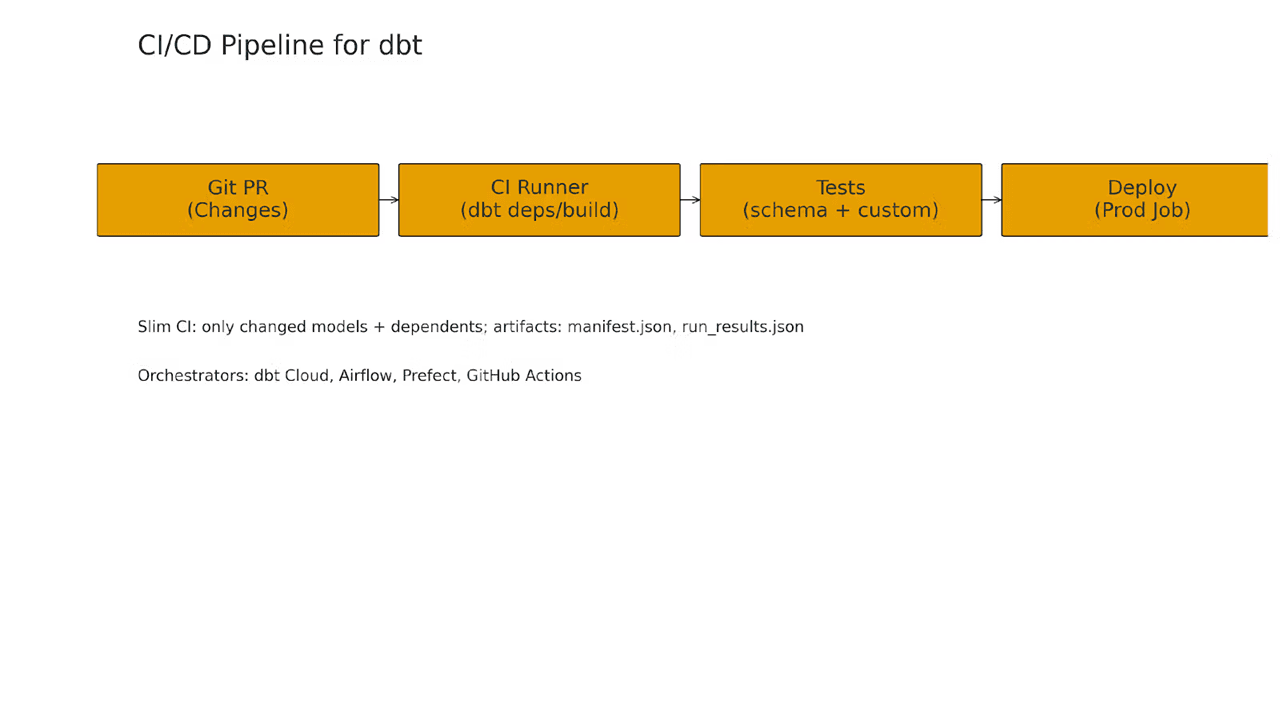
Figure 4. CI/CD pipeline for dbt—PR → Build → Test → Deploy
Options: dbt Cloud for jobs and artifacts; or Airflow/Prefect/GitHub Actions with commands like:
dbt depsdbt seeddbt rundbt test
Data governance & quality built in
Source freshness checks ensure upstream loads are timely.
Schema and custom tests prevent regressions (e.g., amount_usd >= 0).
Snapshots track SCD changes over time.
dbt docs provides searchable lineage and model descriptions.
Migrating from ETL to ELT (a phased plan)
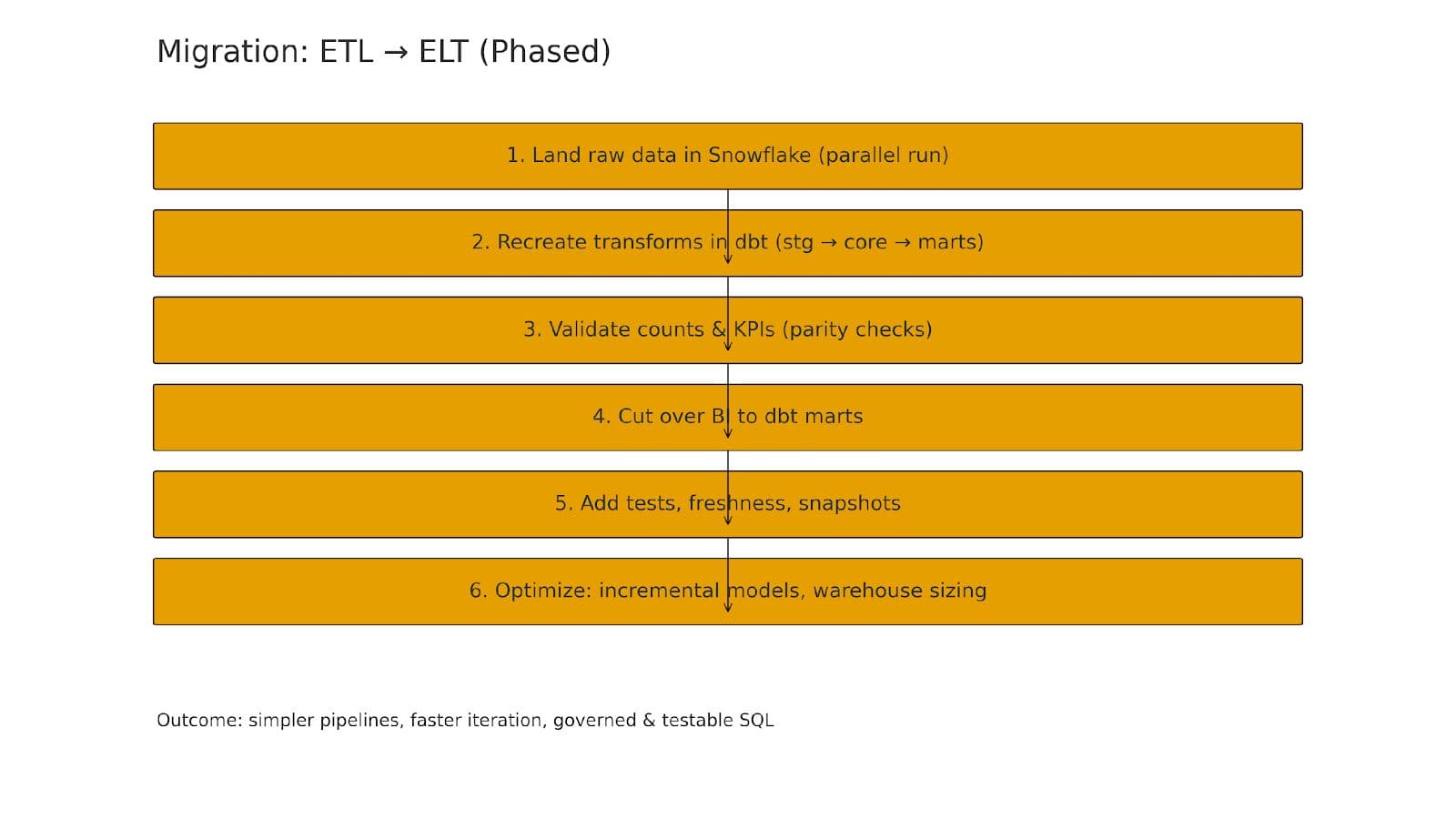
Figure 5. Phased migration from ETL to ELT
Parallel run: keep legacy ETL, start landing the same sources to raw.* in Snowflake.
Recreate transforms in dbt model-by-model, starting with high-leverage facts/dims.
Validate row counts, checksums, and KPI parity.
Cutover BI to dbt marts then retire equivalent ETL transforms.
Harden: add tests, freshness, snapshots; wire CI/CD.
Optimize: incrementalization, warehouse sizing, cluster keys, and caching.
Example: daily finance revenue mart
Goal: product analytics & finance both need consistent daily revenue. Use fct_revenue for atomic transactions and a finance_daily_rev model for daily aggregates by currency/customer/region.
Recommended tests: no duplicate day+customer and non-negative amounts. BI should query the daily mart directly.
Common pitfalls (and how to avoid them)
Re-creating monolithic ETL: keep transforms modular with clear ref() boundaries.
Giant do-everything models: split into staging → core → marts.
No tests: start with unique/not_null + a few business rules.
Skipping incrementalization on large facts.
Mixing dev & prod environments.
Final checklist
Raw sources defined with freshness in sources/*.yml
Staging models per table with type/semantic cleanup
Core facts/dims with clear grain & unique_key
Incremental configs for big facts
Tests (schema + business) and source freshness
Environments mapped to dbt targets and Snowflake roles/warehouses
CI running dbt build on PRs
Docs generated and shared with stakeholders
Call to action
If you’re still pushing heavy transformations through external ETL tools, this is the moment to modernize. Start with a single domain, define raw sources, build clean staging models, add tests, and let Snowflake + dbt handle the transformation layer. Your pipelines will be simpler, faster, and far easier to trust.
Loading comments...