
From Hours to Minutes: Scaling Data Pipelines with dbt

By Aanchal Gupta • 4/21/2026
As data volumes grow, reprocessing entire datasets during every pipeline run becomes increasingly inefficient. While incremental processing is a common approach to address this, implementing it effectively in traditional ETL systems can be complex and difficult to maintain.
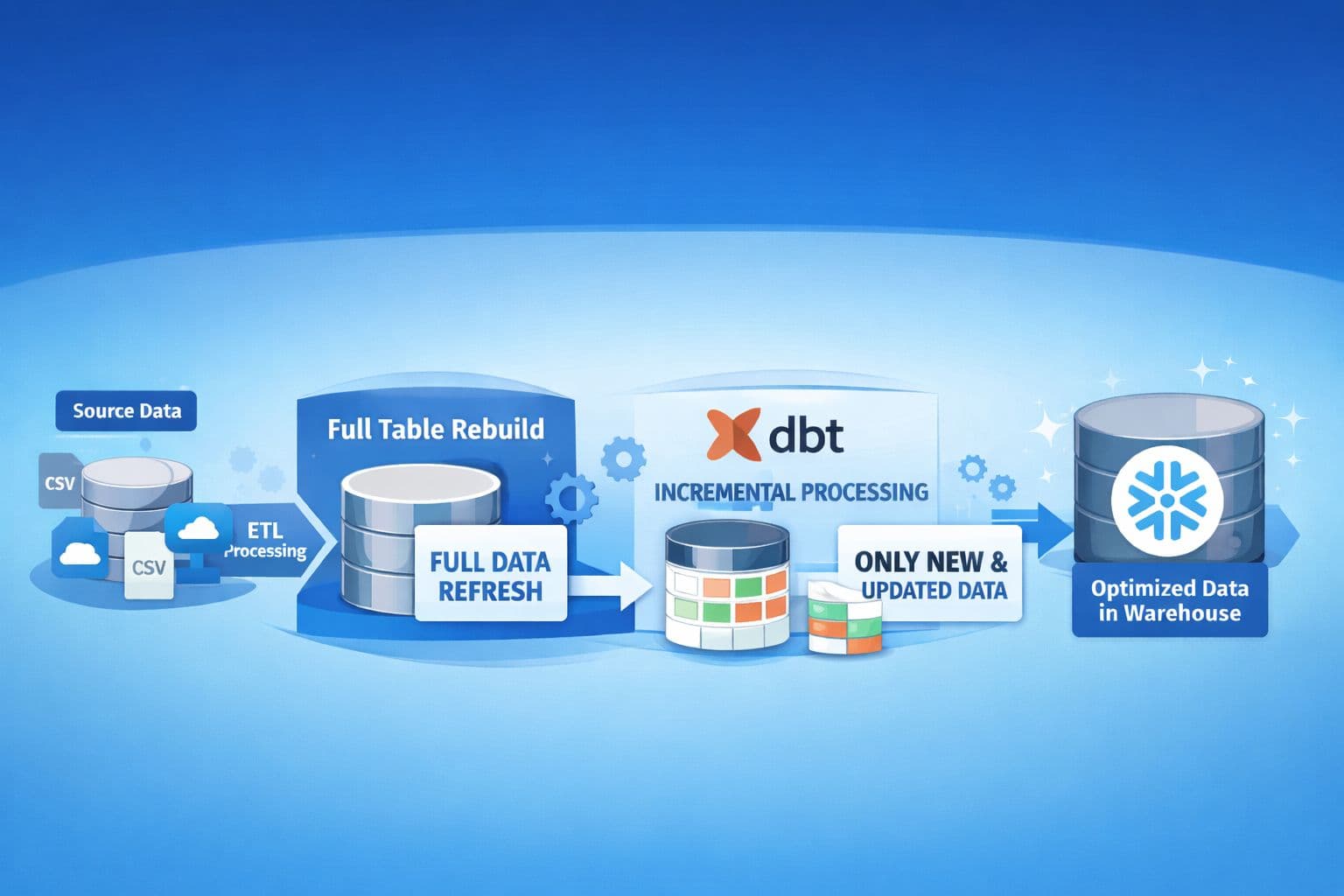
In our case, the existing ETL pipelines relied on tightly coupled orchestration and custom logic to handle incremental updates. Even small data changes often triggered full table rebuilds, leading to unnecessary computation and higher costs.
To address this, we adopted dbt’s incremental processing.
The Problem: Full-Table Reprocessing
Previously, our pipelines rebuilt entire tables on every execution, regardless of how much data had changed. This resulted in:
Recomputing all rows in the target table, even when only a small subset of records was updated
Increased warehouse usage, as large datasets were processed repeatedly
Longer execution times, which worsened as data volume grew
This approach did not scale efficiently and made optimization difficult.
The Solution: dbt Incremental Models
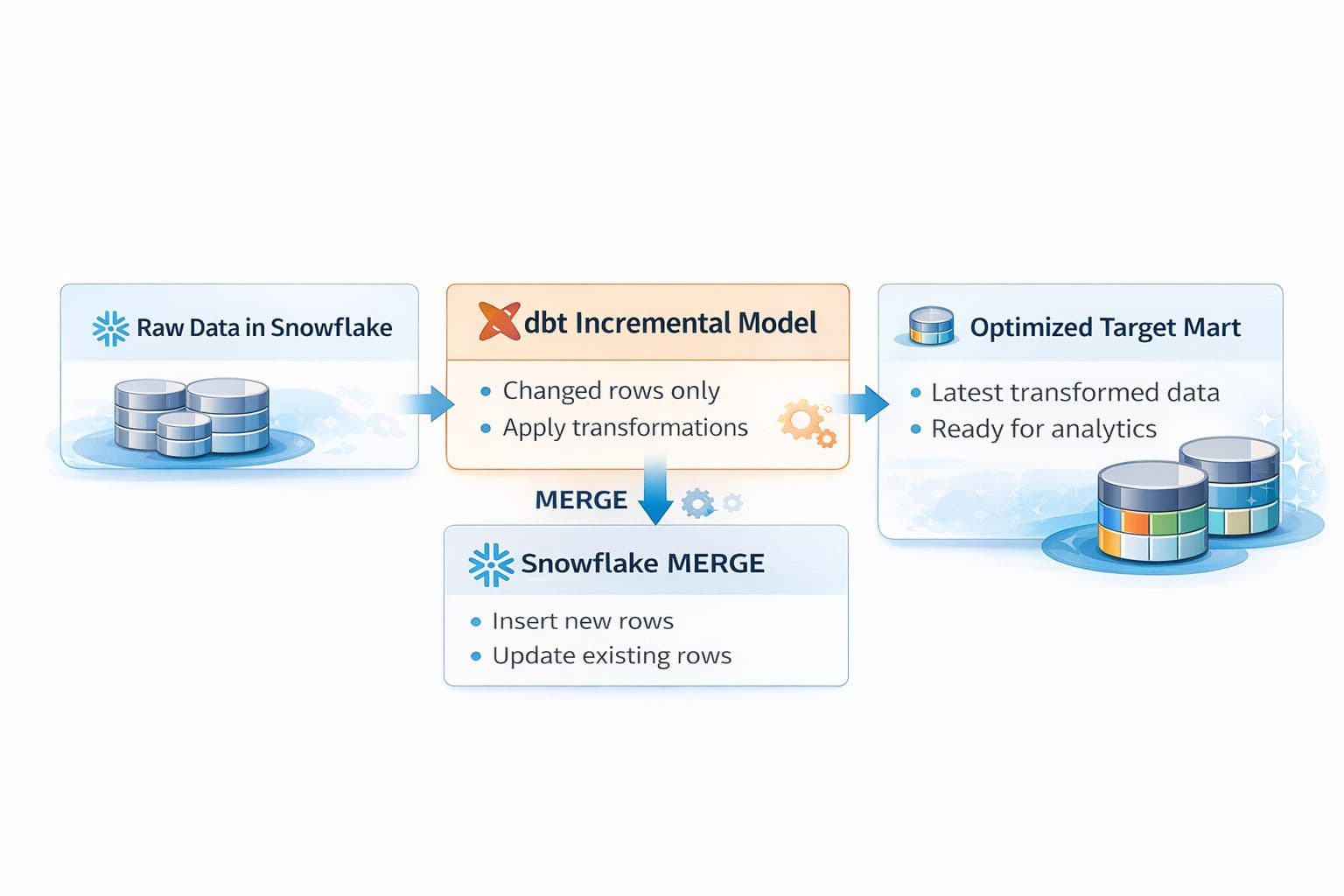
dbt follows an ELT approach, where transformations are applied after data is loaded into the warehouse. Its incremental models allow transformations to run only on new or modified records instead of the full dataset.
In our Snowflake environment, we used:
materialized='incremental'
incremental_strategy='merge'
This leverages Snowflake’s MERGE operation to apply inserts and updates efficiently.
Why dbt for Incremental Processing?
Incremental logic can also be implemented without dbt using custom SQL or CDC pipelines. However, in our setup, this introduced several practical challenges:
Fragmented logic across layers: Incremental conditions were implemented in upstream jobs rather than alongside transformation logic, making pipelines harder to understand and debug.
High maintenance overhead: Each pipeline required custom incremental handling, leading to duplicated logic and inconsistent implementations.
Limited standardization: Different datasets followed different patterns for updates, increasing complexity over time.
Schema change friction: Handling evolving schemas often required manual intervention or full refreshes.
Tight coupling with orchestration: Pipeline behaviour depended heavily on external job configuration, reducing flexibility.
With dbt:
Incremental logic is defined directly in SQL models using is_incremental()
Built-in strategies like merge handle updates and inserts using warehouse-native capabilities
Schema changes can be managed with configurations like on_schema_change='sync_all_columns'
Transformation logic is centralized, version-controlled, and easier to maintain
In our case, this simplified incremental pipelines and made them easier to manage, without requiring custom scripts across multiple layers.
How Incremental Models Work
On First Run: dbt creates the full model from source data.
On subsequent runs: dbt only processes records that have changed or been added since the last pipeline execution.
This ensures that computation is limited to the portion of data that changed.
Implementing Incremental Models in dbt
1. Setting Up the Incremental Model
To configure an incremental model in dbt, the first step is to define it in your .sql model file. The key configuration is the materialized setting, which tells dbt to use incremental processing rather than a full refresh.
Here’s a sample configuration:
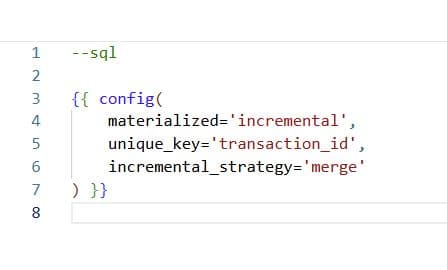
materialized='incremental': This tells dbt to build the model incrementally.
unique_key: This specifies the column that dbt uses to identify rows uniquely, typically a primary key or timestamp.
incremental_strategy='merge': This strategy allows dbt to merge new data into the existing model (with the option to update or append records as needed).
2. Filtering New or Changed Data
The next step is to define the transformation logic that filters only the new or updated data. Here’s how to implement it:
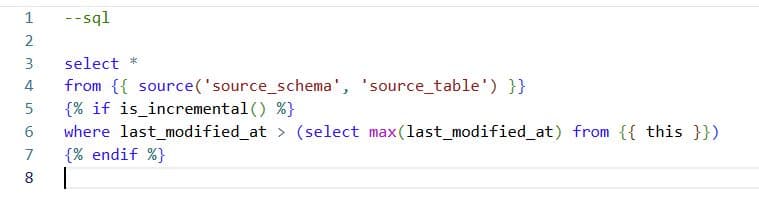
is_incremental (): This function ensures that dbt only processes the data that has been changed since the last run.
The filter condition last_modified_at > max(last_modified_at) ensures that only the records modified after the last successful run are included.
By implementing this pattern, dbt will only process and transform the newly added or modified rows, drastically reducing the computational overhead.
Real-World Use Case:
One of our key models processed a daily transactional dataset — roughly 10 million rows. In the old setup, this model was rebuilt fully every day, regardless of the number of changed records.
Once we moved it to a dbt incremental model, here’s what changed:
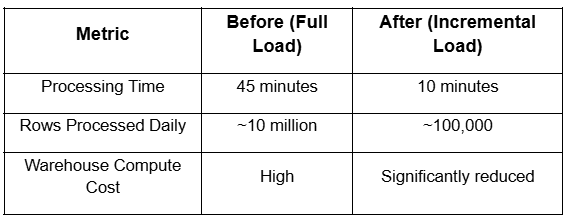
By narrowing processing only for changed records, we achieved an 80% reduction in runtime and slashed compute costs — without sacrificing data freshness or quality.
Key Learnings and Considerations
While the switch to dbt's incremental models brought significant improvements, the process wasn't without its challenges. There were key learnings that helped refine our implementation.
1. Schema Changes and Evolving Source Data
One of the challenges we encountered early on was handling schema changes. In our original pipeline, schema changes (like adding new columns or altering types) were straightforward to manage. However, dbt's incremental models require more careful attention to evolving schemas.
For example, when adding a new column, we had to ensure that dbt would pick up the change during the incremental processing. We tackled this by:
Adding schema change detection logic to automatically add new columns during the incremental runs.
Using on_schema_change='sync_all_columns' in our configuration, which ensured that dbt updated the schema automatically without requiring a full refresh.
This was a learning curve, but ultimately, it provided much better control over the data structure and allowed us to handle schema evolution more gracefully.
2. Handling Deletes and Updates Beyond Timestamps
Another challenge we encountered was managing deletes and specific types of updates that aren’t handled by dbt’s default incremental approach.
While dbt’s incremental logic works seamlessly for inserts and updates based on timestamps, deletes require special handling. In our case, we implemented logic to detect deletes by checking an "is_deleted" flag, which allowed us to remove records during the incremental process.
3. Long-Term Maintenance
One important takeaway is that dbt's incremental models require careful planning around maintenance. Over time, as data grows and new requirements emerge, it’s crucial to periodically evaluate:
Indexes and how to optimize query performance.
Incremental filter logic to ensure it doesn’t become inefficient as the data scales.
The unique key strategy to ensure that the identifier remains relevant as new data is added.
The Conclusion
The shift to dbt incremental models was a game-changer in optimizing our ETL workflows. Not only did we significantly reduce the computational load and improve performance, but we also gained better control, visibility, and scalability in our pipeline.
In our experience, dbt’s incremental models helped us optimize our workflows. The ability to process only new or changed records ensures faster runs, reduces warehouse costs, and gives you more control over your data pipeline.
Loading comments...