

How to Resolve ITL Contention for Lightning-Fast Oracle Database Performance
By Althaf Mohammed • 7/15/2025
Is your Oracle database struggling to keep the system running during high-volume transactions? Are important SQL queries delayed excessively? If the answer is yes, then you have probably seen the "enq: TX – allocate ITL entry" wait event in your diagnostics. It is one of the performance bottlenecks Oracle databases frequently face. ITL contention can cause significantly poor performance on the database including slow queries, frustrated users, and even operational deadlines.
This blog discusses in detail on the ITL contention definition, the reasons this infamous wait event occurs, and useful ways to help solve it. It does not matter whether you are a veteran in Oracle database administration or a beginner, I am sure you will find useful information and techniques to improve the performance of Oracle databases.
The "enq: TX – allocate ITL entry" Wait Event In Focus
As the wait event "enq: TX – allocate ITL entry" suggests, at the most basic level, ITL contention is the name of a wait event. The Interested Transaction List (ITL) has something to do with contention. Each database block has an ITL for Oracle to monitor total transactions that are active on a particular block of data. In the case of new transactions, an ITL is claimed and changes are allocated to the database block in question.
The above problem surfaces when:
· There are several attempts to execute different transactions that are trying to access the same block at the same time.
· The limit of the ITL slots has been reached, or there is no space in the block for the ITL to grow.
Blocks without ITL slots readily available must relinquish bandwidth, which can cause sluggishness. This scenario becomes common place within highly transactional settings in financial services, inventory systems, and healthcare systems where there are large volumes of concurrent inserts or updates on important tables that are performed.
Why Does ITL Contention Hurt Performance?
An Oracle database block is designed to have headers that hold passively dynamic transaction logs (ITLs), thus giving each block a specific structure. Blocks that have too many transactions due to ITL exceeding limits will have their queries delayed if there is a tightly packed block. Instead of smoothly arriving at the slew of ITL slots, queries will end up enduring longer wait than expected, which overstretched the database wait time.
Diagnosing ITL Contention Step-by-Step
In resolving ITL contention, first, it needs to be properly diagnosed. One needs to follow this sequence of actions to identify wait events:
1. Examine the AWR Report
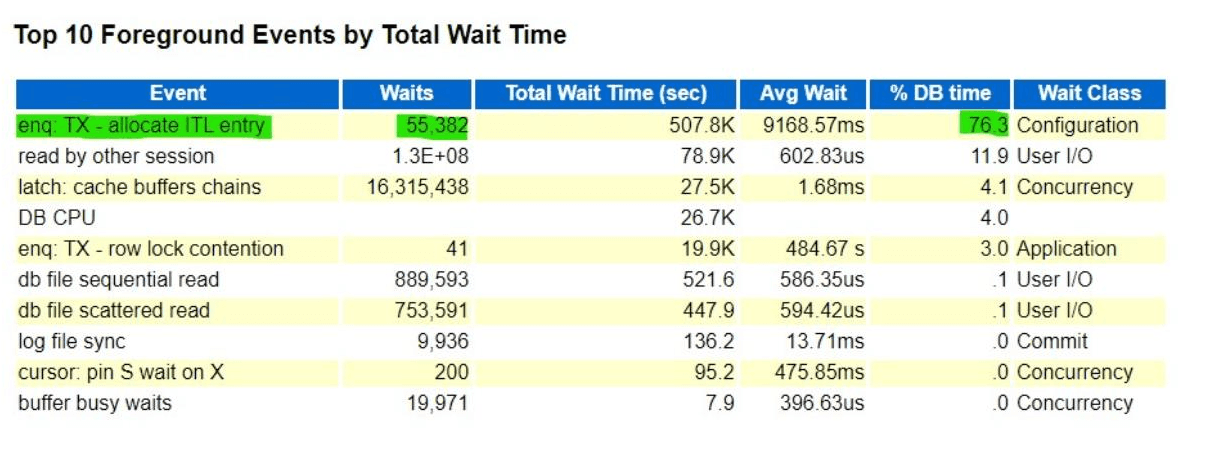
Generate the Automatic Workload Repository (AWR) report. It contains a comprehensive performance overview of the database, along with its most critical wait events. Concentrate on the Top Wait Events section. The excitement “enq: TX - allocate ITL entry” provides some of the most valuable evidence points of ITL contention.
As an example, one of my clients had an AWR report showing a staggering 76.3 percent of DB TIME consumed waiting on a single wait event. Since DB TIME is defined as the total time spent running SQL statements (which encapsulates both the CPU and wait time), that figure is incredibly high in a single wait event—an indication of a growing bottleneck.
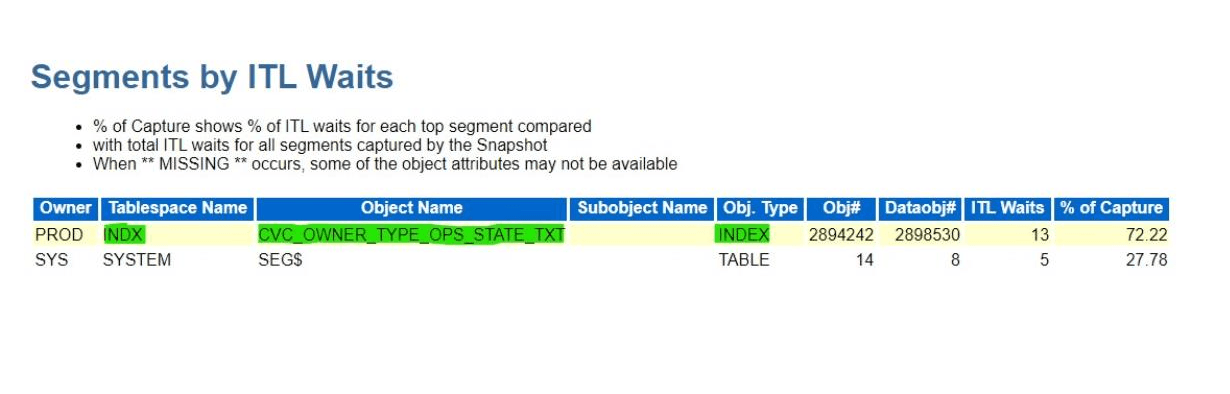
Now we need to find out the objects that most waits with the contention of the “ITL entry event” Below block from the AWR Report will show the objects involved in the ITL wait event.
2. Use Oracle Enterprise Manager (OEM)
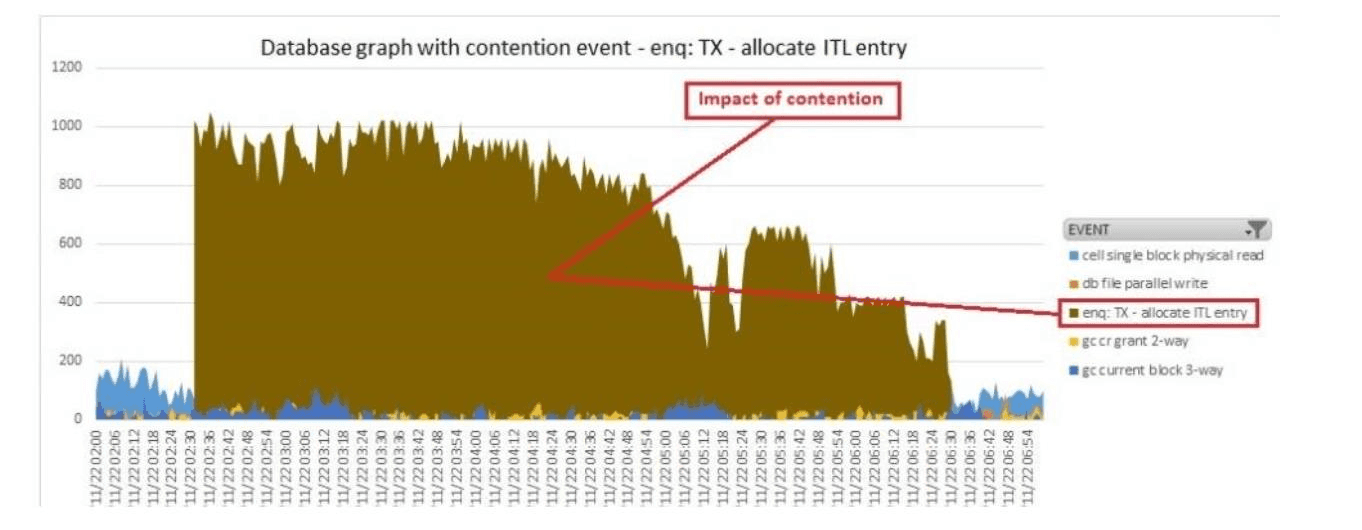
Another trusted source is Oracle Enterprise Manager (OEM). This monitoring console ITL wait times and the ITL device-related spikes provide a graphical representation of various performance metrics. Sudden spikes during peak transaction times tend to confirm this issue along with the degree of severity.
3. Execute Specific Investigations
After identifying the ITL contention problem, focus on the impacted tables or indexes. Specialized SQL queries can uncover contending objects in the database, and SQL query as follows captures the essence:
SELECT o.object_name obj, o.object_type otype, ash.SQL_ID, w.class, COUNT(1)
FROM gv$active_session_history ash,
(SELECT rownum class#, class FROM v$waitstat) w,
all_objects o
WHERE event='enq: TX - allocate ITL entry'
AND w.class#(+) = ash.p3
AND o.object_id(+) = ash.CURRENT_OBJ#
GROUP BY o.object_name, o.object_type, ash.SQL_ID, w.class
ORDER BY COUNT(1) DESC;
Also executing this SQL allows one to table data and objects (any tables or indexes) which ITL most frequently contended with. It provides a guide for pinpointed optimizations.
Common Causes of ITL Contention
The factors is broad ranging as two main reasons as to why ITL contention occurs:
1. INTRANS and MAXTRANS Settings set too Low
Each individual block contains a number of ITL slots as dictated by the INITRANS parameter. The MAXTRANS value determines the upper boundary of how many transactions can concurrently lock a block. When set too low in a highly populated environment, as in, high ITL contention crossover is strongly likely.
2. Overcrowded Blocks
Data packed into blocks too tightly will not leave any free space for the ITL to expand. This problem is worsened in cases where PCTFREE is set too low, or where tables are experiencing heavy insert traffic concentrated in specific areas.
Solutions to Tackle ITL Contention
1. Tune INITRANS and MAXTRANS
The first step in addressing ITL contention issues is often tuning some of the parameters to achieve better block usage. Increasing INITRANS increases the number of slots available at the start, which reduces the risk of contention.
Consider the following example:
```
ALTER TABLE products INITRANS 20;
ALTER INDEX customer_data REBUILD INITRANS 30;
```
2. Adjust the PCTFREE Parameter
This parameter controls the percentage of a block that can be reserved for future updates. THESE including PG growth and ITL expansion. Increasing this percentage can ensure that blocks remain pliable to pressure even during high write concurrency.
Example:
```
ALTER TABLE orders PCTFREE 30;
```
Adjust this parameter with care. Increasing PCTFREE too much results in weaker block efficiency and increased storage wastage.
3. Spread Transaction Loads
Attempt to balance the transactions evenly across the database. Also, consider table partitioning or load balancing to reduce the concentration of activity on the problem blocks.
4. Index Optimization
Indexes play a big role in minimizing contention. Their performance is improved by optimally rebuilding them with INITRANS and PCTFREE settings as these undergo heavy usage.
Example:
```
ALTER INDEX transactions_index REBUILD PCTFREE 20 INITRANS 25;
```
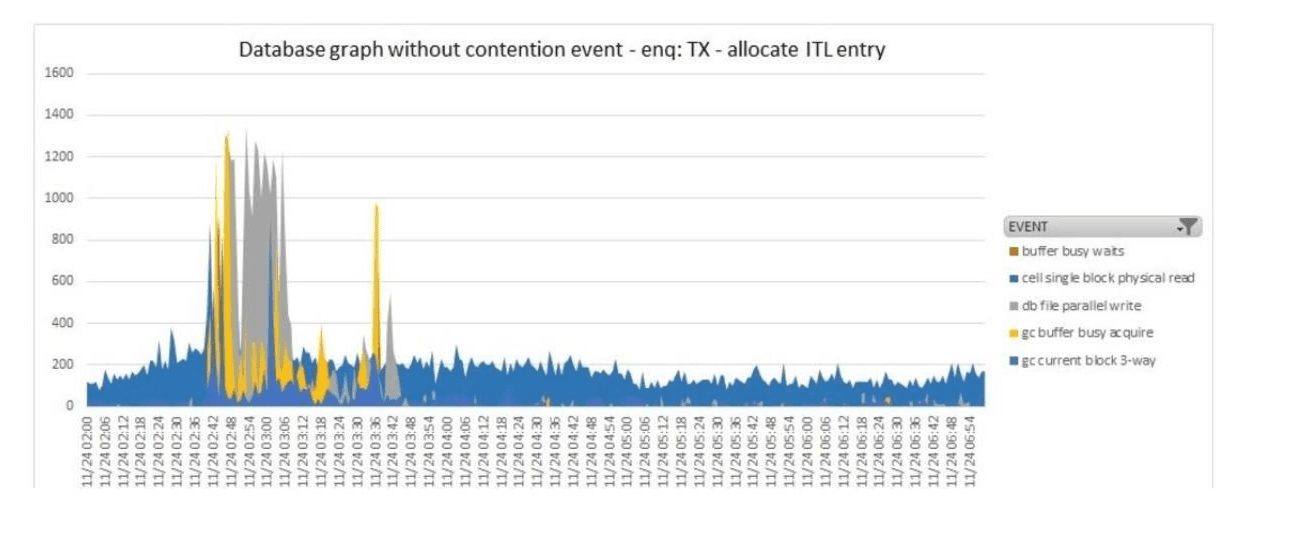
After the above fix client has run the transaction and now the queries are performing well. Below is the block from the OEM which shows there are no wait events which indicates “enq: TX – allocate ITL entry”.
Proactive Monitoring Strategies
In addition to reactive measures, these steps will assist with maintaining ITL contention through proactive monitoring.
Regularly Review AWR Reports: Review AWR reports on a regular basis to ensure prompt action is taken on emerging performance issues.
Set Alerts in OEM: In Oracle Enterprise Manager setup wait thresholds for ITL and assign flags as appropriate.
Conduct Stress Tests: Assess non-production environments for high-traffic scenarios in order to eliminate problems before users see them.
Common Misconceptions ITL Contention
Myth 1: “Only large databases will experience ITL contention.”
Fact: It is the high concurrency environments that ITL contention issues, not the scale of the database.
Myth 2: “There must be plenty of storage if it’s so frustratingly contended.”
Fact: ADDing storage does not eliminate underlying block level configurations such as INITRANS and PCTFREE settings.
Best Practices for Environments That Have A Large Volume Of Transactions
Understand Workload: Monitor transaction activity for a specific period and modify settings to optimize for peak load times.
Partition Strategically: Use transaction trends to split tables to ease block contention.
Regularly Maintain Indexes: Well-maintained indexes speed up data access and lessen the workload on particular data blocks.
Final thoughts
The recommended actions to alleviate ITL contention in an Oracle database require undertaking significant proactive optimization. Adjusting INITRANS and PCTFREE, actively managing the Oracle Enterprise Manager (OEM) watchdog, and balancing workloads help remove the ITL bottleneck and reduce the performance impact. To start, implement a few small adjustments and observe their effects, then incrementally refine the system's configuration to sustain future demand.
Can you handle ITL contention? Begin with a review of your AWR reports questionnaire and actively manage the performance of your database!
Loading comments...