

Optimizing QuickSight for Petabyte-Scale Data: Lessons Learned

By Girish Anuga • 10/15/2025
As organizations accumulate more and more data, the challenges of scaling business intelligence (BI) tools become increasingly apparent. While services like Amazon Athena and QuickSight are built to handle large datasets, there are limitations—especially when working with billions of records and attempting to leverage SPICE (Super-fast, Parallel, In-memory Calculation Engine) for performance.
In this post, we’ll walk you through our journey of attempting to load and visualize over 1.5 billion rows of data from Amazon Athena into QuickSight, the bottlenecks we hit with SPICE memory limits and visualization timeouts, and the solutions we implemented to finally get our dashboards running efficiently.
The Starting Point: 70 million Rows
Our data pipeline began by refreshing a manageable 70 million rows from Athena into QuickSight. Using SPICE, we could refresh this dataset in around 1 hour, which was acceptable for our reporting needs.
However, this was just a small slice of our data.
Scaling Up: 1.5 billion Rows & Trouble Brewing
As we tried to scale up and bring in the full 1.5 billion rows, things started to break.
We immediately faced query timeout issues during SPICE refreshes. To mitigate this, we increased Athena's query timeout to the maximum allowable limit of 240 minutes, but the issue persisted. Even with incremental refreshes, QuickSight began to throw this critical error:

This essentially means our dataset exceeded the 1 TB logical limit for SPICE.
Ref: https://docs.aws.amazon.com/general/latest/gr/aws_service_limits.html#amazon-athena-limits
Understanding the Problem: Why SPICE Was Failing
To understand what was happening behind the scenes, we analyzed the size of the data.
Interestingly, for a sample of 330 million records, Athena reported a table size of just 13.4 GB. However, once the same data was imported into SPICE, the memory usage ballooned to 930 GB.
This massive discrepancy was unexpected, so we reached out to AWS Support for clarification.
They pointed us to the SPICE sizing formula:
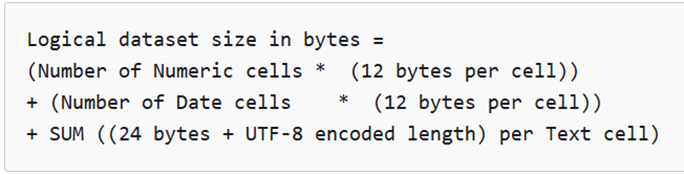
Ref: https://docs.aws.amazon.com/quicksight/latest/user/spice.html#spice-capacity-formula
Given our dataset had:
33 crore (330 million) rows
200 columns
A heavy presence of text fields
The calculated logical size was over 2.1 TB, making the behavior completely expected. We had simply outgrown what SPICE could handle, even after AWS increased our dataset limit from 1 TB to 4 TB.
However, with new data being ingested daily, even 4 TB wasn't enough.
Workarounds and Optimization Steps
Once we realized that raw-level data at this scale wasn't going to work with SPICE, we explored several optimization strategies recommended by AWS and other BI practitioners:
1. Redesign the Data Model
Rather than importing raw transaction data, we started to pre-aggregate key metrics in Athena itself. This significantly reduced the number of rows we needed to import.
2. Limit Text Columns
Text fields are a major memory hog in SPICE. By replacing some columns with integers, Booleans, or encoded references, we were able to cut down the dataset size.
3. Use Direct Query Mode
We switched to Direct Query mode, which allows QuickSight to query Athena in real-time without importing data into SPICE. This approach bypasses SPICE's memory limits but introduces performance challenges of its own.
4. Evaluate Amazon Redshift
AWS recommended using Redshift as a more scalable and performant source. Redshift can handle petabyte-scale data and works more seamlessly with Direct Query in QuickSight. While we didn’t migrate immediately, it’s something we’re evaluating for long-term scalability.
Visualization Timeout Issues in Direct Query Mode
After shifting to Direct Query, we faced a new problem: QuickSight dashboards would display the following error for some reports:

This occurs when a visualization takes more than 2 minutes to render—a hard limit in QuickSight that cannot be increased, no matter your configuration.
Ref:https://docs.aws.amazon.com/quicksight/latest/user/troubleshoot-athena-query-timeout.html
The issue? While our Athena queries typically completed in 3 to 4 minutes, QuickSight couldn't wait that long, and users were left staring at timeouts instead of insights.
Final Solution: Aggregation + Performance Tuning
To work around this, we took the following steps:
Pre-aggregated the data in Athena using SQL queries that summarized key metrics before visualization.
Optimized our custom queries to return results in under 60 seconds—ensuring compatibility with QuickSight's hard timeout of 2 min.
Simplified complex dashboards, splitting them into smaller dashboards with fewer visual elements per page to reduce processing load.
By taking these measures, we managed to get our dashboards running again—with acceptable performance and within QuickSight’s limits.
Key Takeaways
SPICE has a logical dataset size limit, not just a raw data size cap. Even a 13 GB Athena table can consume nearly 1 TB of SPICE memory depending on data types.
A high number of columns and text fields can significantly increase SPICE usage. Minimize them wherever possible.
QuickSight’s Direct Query mode is powerful, but the 2-minute visualization timeout is non-negotiable.
Pre-aggregation and data model optimization are your best friends when scaling dashboards with large datasets.
Amazon Redshift is a better long-term solution for petabyte-scale analytics in QuickSight.
What’s Next for Us
We’ve now stabilized our dashboards using a hybrid approach of Direct Query + pre-aggregation, but we’re actively considering a move to Redshift for more flexibility and better control over performance.
While QuickSight and Athena are powerful on their own, scaling them together requires careful data modeling, memory management, and an awareness of the underlying limits.
If you're running into similar challenges or planning to scale your reporting infrastructure, feel free to reach out—we're happy to share more from our journey.
Loading comments...